Workday’s biannual release cycle means every September brings a fresh wave of changes, and 2026R2 is no exception. The distinction that matters most for IT and HR leaders isn’t what’s new. It’s what’s optional and what isn’t. Opt-in features are ones you can choose to activate on your own timeline. Mandatory features are ones that apply automatically, whether your team has tested them or not. Getting that distinction wrong is how organisations end up scrambling in October.
Why This Distinction Matters More Than the Feature List Itself
Most release coverage focuses on what’s new: the headline features, the shiny dashboards, the AI-powered tools. That’s useful, but it’s not the question that actually determines how much work your team has ahead of it. The real question is simpler: which of these changes can we schedule on our own terms, and which ones are landing in our tenant regardless of whether we’re ready?
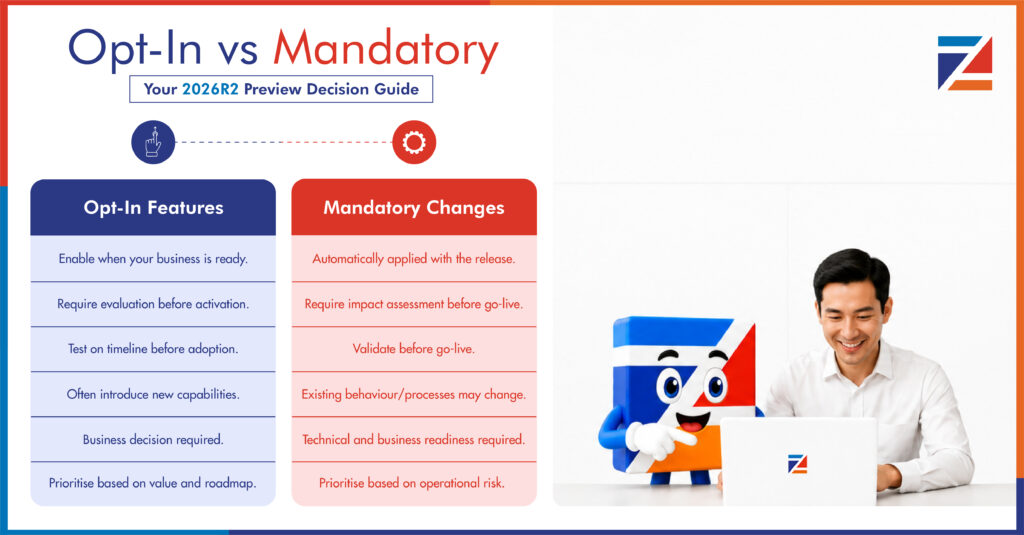
This matters because opt-in and mandatory features carry very different planning implications. An opt-in feature is a decision. You can weigh the benefit, assess the effort, and choose your moment. A mandatory feature is a deadline. It arrives on Workday’s schedule, not yours, and if your integrations, reports, or business processes depend on the thing it’s changing, you find out the hard way.
What “Opt-in” Actually Means in a Workday Release
Opt-in features sit behind a configuration flag. Workday builds them, documents them, and makes them available, but your tenant keeps its existing behaviour until someone with the right security role actively switches the feature on. This gives your team room to breathe you can review the release notes, run the feature in your preview tenant, decide whether it’s worth the change management effort, and schedule the rollout for a quiet week rather than the week after go-live.
The trap with opt-in features isn’t technical. It’s organisational. Because nothing breaks if you ignore them, they tend to pile up, release after release, until an organisation is sitting on two or three years of inactivated functionality that nobody has time to evaluate. If that sounds familiar, it’s worth treating your opt-in backlog as its own project rather than something to revisit “eventually.”
What “Mandatory” Actually Means, and Why It Catches Teams Out
Mandatory features are different. They roll out automatically at go-live, and in most cases there’s no configuration flag to hold them back. Workday will sometimes offer a short grace period where you can opt out of an early version of a UI or workflow change, but that window closes, and once it does, the new behaviour becomes permanent.
A useful real-world example: Workday’s Change Job Templates enhanced user experience began as an optional upgrade in an earlier release, giving administrators the ability to hold off adopting the new interface. That optionality was always scheduled to end. By 2026R2, the enhanced experience becomes the standard, and administrators who never opted in during the grace period will simply see their templates behave differently once the release lands. That’s the pattern to watch for across the platform: features that start as opt-in pilots and quietly graduate to mandatory once Workday judges’ adoption mature enough.
The organisations that get caught out aren’t the ones who missed the announcement. They’re the ones who saw it, filed it under “not urgent,” and didn’t revisit it before the feature stopped being optional.
Retrofit Integrations: The Hidden Cost of Mandatory Changes
This is where 2026R2 planning tends to go sideways. A mandatory UI change might be a minor inconvenience for end users, but if you have integrations, custom reports, or EIBs built against the workflow that’s changing, a “cosmetic” update can quietly break something in your integration layer. Field names shift. API responses change shape. A business process that used to fire a webhook at a specific step now fires it somewhere else in the sequence.
This is what we mean by retrofit integrations: the work required to bring existing, previously stable integrations back into alignment after a mandatory change lands underneath them. It’s rarely dramatic. It’s usually a handful of broken-field mappings or a report that silently starts returning incomplete data. But it’s exactly the kind of issue that doesn’t show up in preview testing unless someone specifically goes looking for it, because the integration itself wasn’t the thing that changed. The feature underneath it was.
If your team is only testing the features Workday lists as changed, and not the integrations sitting downstream of them, you’re testing the wrong layer.
How to Build Your Opt-in vs Mandatory Decision Matrix
A simple framework helps here. For every feature in the 2026R2 release notes, ask three questions:
First, is this opt-in or mandatory? Workday’s release documentation flags this explicitly, so this shouldn’t require guesswork. If it’s unclear, treat it as mandatory until proven otherwise.
Second, does anything downstream depend on the thing this feature is changing? This is where most teams under-invest. It’s not enough to check whether the feature itself works. You need to trace every integration, report, and business process that touches the same object or workflow.
Third, what’s the cost of testing this properly versus the cost of it breaking in production? For mandatory features touching core HR or payroll processes, that calculation almost always favours thorough preview testing, even if it means reallocating time from other opt-in evaluations.
Running every feature through this matrix during the preview window turns a long, undifferentiated release notes document into a prioritised action list.
A Simple Framework for Your 2026R2 Preview Window
Workday’s preview tenant typically opens roughly five weeks ahead of go-live, giving teams a defined testing window before the September release becomes permanent. Use that window deliberately rather than reactively.
Start by pulling the full release notes and sorting every feature into opt-in or mandatory before you do anything else. Then map your critical integrations, reports, and business processes against the mandatory list specifically, since that’s where retrofit work will originate. From there, build a short list of opt-in features worth evaluating this cycle, rather than trying to assess all of them. Test the mandatory changes and their downstream dependencies first, opt-in features second, and leave time before go-live to fix anything the testing surfaces rather than discovering it in production.
Organisations that treat the preview window as a formality tend to spend October firefighting. Organisations that treat it as a structured testing exercise tend to spend October moving on to the next quarter’s priorities.
Frequently Asked Questions
What’s the difference between opt-in and mandatory features in a Workday release?
Opt-in features require an administrator to actively enable them and won’t change your tenant’s behaviour until someone does. Mandatory features roll out automatically at go-live and apply whether your team has reviewed them.
How do I find out which 2026R2 features are mandatory?
Workday’s release notes explicitly flag whether each feature is opt-in or mandatory, along with any grace period for features transitioning from optional to required. Reviewing this list at the start of your preview window, rather than partway through, is the single highest leverage step in release planning.
Why do mandatory feature changes affect integrations that weren’t directly changed?
Many integrations, reports, and EIBs are built against the underlying data structure or workflow sequence of a feature, not the feature’s user interface. When Workday changes that underlying behaviour as part of a mandatory update, anything built against the old behaviour can break, even though the integration itself was never touched.
How long is the 2026R2 preview window?
Workday’s preview tenants generally open around five weeks before the production release date, consistent with the pattern from previous release cycles. Check your own tenant’s preview dates directly, since exact timing can vary slightly by release.
What should we prioritise if we don’t have time to test everything?
Mandatory features with downstream integration dependencies first, since those carry the highest risk of production breakage. Opt-in features can generally wait, since nothing breaks if you leave them untouched for another cycle.
Get a Second Opinion on Your 2026R2 Readiness
If you’re not confident your integration landscape has been mapped against the mandatory changes in this release, that’s exactly what a Workday Health Check is for. It’s a free assessment, and for the first 50 organisations that book, it comes with a full readiness checklist you can run through before the preview window closes. Book yours at zeneesha.com.